


Goals and Outcomes
Connecting a WhatsApp Business API account gives you the full power of WhatsApp marketing, but the setup process can feel technical. Manual Send and Bulk Send give merchants a practical starting point — a way to send abandoned checkout recovery and order update messages today, test your templates, and learn how WhatsApp marketing works while your account gets ready.
In this article, you will learn how Manual Send and Bulk Send work, and how to use them to start reaching your customers on WhatsApp.
Feature Overview
Manual Send lets you send personalized WhatsApp messages to individual customers directly from your Trust1 dashboard. Unlike sending from WhatsApp Web directly, Manual Send is connected to your store data — giving you access to each customer’s profile, cart details, order status, and history in one place before you send.
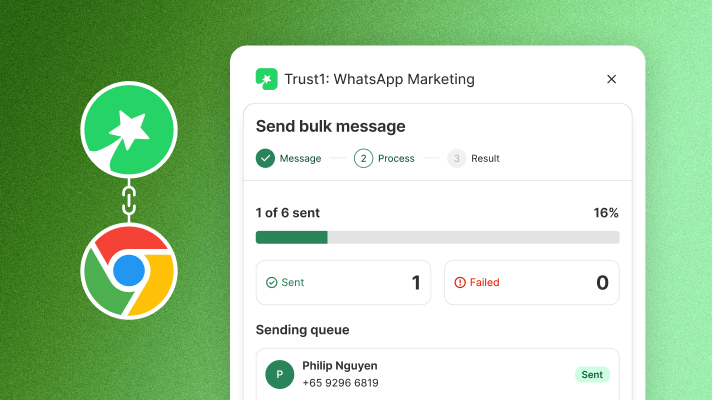
Bulk Send extends this to multiple customers in one flow, using the Trust1 Chrome Extension. Instead of sending one message at a time, you can select multiple records and send in a single session.
Both features work through WhatsApp Web and are designed for merchants who are just getting started. For large-scale sending, we recommend the official WhatsApp API.
Both features support two use cases:
- Abandoned checkout recovery — View open checkouts and send a personalized recovery message to each customer
- Order updates — View orders by status and send relevant updates to customers
Step-by-Step Guide
Manual Send
- In Trust1 WhatsApp, go to Manual Send
- Open the Abandoned Checkout or Order Updates tab
- Click on a record to start sending
- Enter your message or choose a saved template — use variables to personalize (recommended)
- Click Send via WhatsApp — a new tab will open with the message pre-filled
- Confirm and send in WhatsApp Web
- Back in Trust1, mark the message as sent to track your progress (recommended)
Bulk Send
- Install the Trust1 WhatsApp Extension from the Chrome Web Store
- In Trust1 WhatsApp, go to Manual Send
- Open the Abandoned Checkout or Order Updates tab
- Select multiple records, then click Send Bulk Message
- Enter your message or choose a saved template
- Acknowledge the sending guidelines, then click Continue Sending
- A WhatsApp Web window will open automatically — do not close it while sending is in progress
- A sidebar will track sending progress in real time
Sending Safely: What You Need to Know
Manual Send and Bulk Send work through WhatsApp Web, which means your account is subject to WhatsApp’s standard messaging policies. To keep your account in good standing, please follow these guidelines before you start sending.
- Account age — Your WhatsApp account must be at least 15 days old before sending
- Network — Keep your phone and computer on the same network; avoid frequent IP changes
- Volume — Start gradually from 50 messages on day one; do not exceed 300 messages per day
- Content — Avoid hard-sell advertising and spam. Personalize every message using available variables (e.g. customer name, cart details)
- Links in messages — Avoid links where possible. If necessary, ensure they are relevant and personalized per recipient
- Scaling up — When you’re ready to send at scale, switch to the official WhatsApp API for full compliance and higher deliverability
A Note on Responsible Use
Manual Send and Bulk Send work through WhatsApp Web and are intended as a starting point, not a long-term solution for high-volume sending. WhatsApp monitors messaging activity and enforces its policies strictly — accounts that receive multiple user reports will be permanently banned.
Please use these tools responsibly. Trust1 is not liable for any account restrictions or bans resulting from misuse. If you notice any misuse, please reach out to us at [email protected] so we can help address it promptly.
Have questions or feedback? Contact us at [email protected].