


Version 1.0 introduces reply notifications — so you never miss a customer response to your broadcasts or automation messages. This release also includes several improvements to automation visibility, message variables, and segmentation.
New Feature: Reply Notifications
Most WhatsApp marketing flows are one-directional. Messages go out, but when a customer writes back, there’s no way to know. Reply Notifications changes that by alerting you via email every time a customer responds to one of your messages.
Why It Matters
A customer who replies to your abandoned cart message is showing intent. One who responds after delivery may have a question — or a complaint worth addressing before it escalates. Reply Notifications gives you the visibility to act on those moments instead of missing them.
How It Works
When a customer replies to a broadcast or automation message, Trust1 sends you an email containing:
- Campaign context — which broadcast or automation triggered the message
- Customer information — contact details
- The customer’s reply
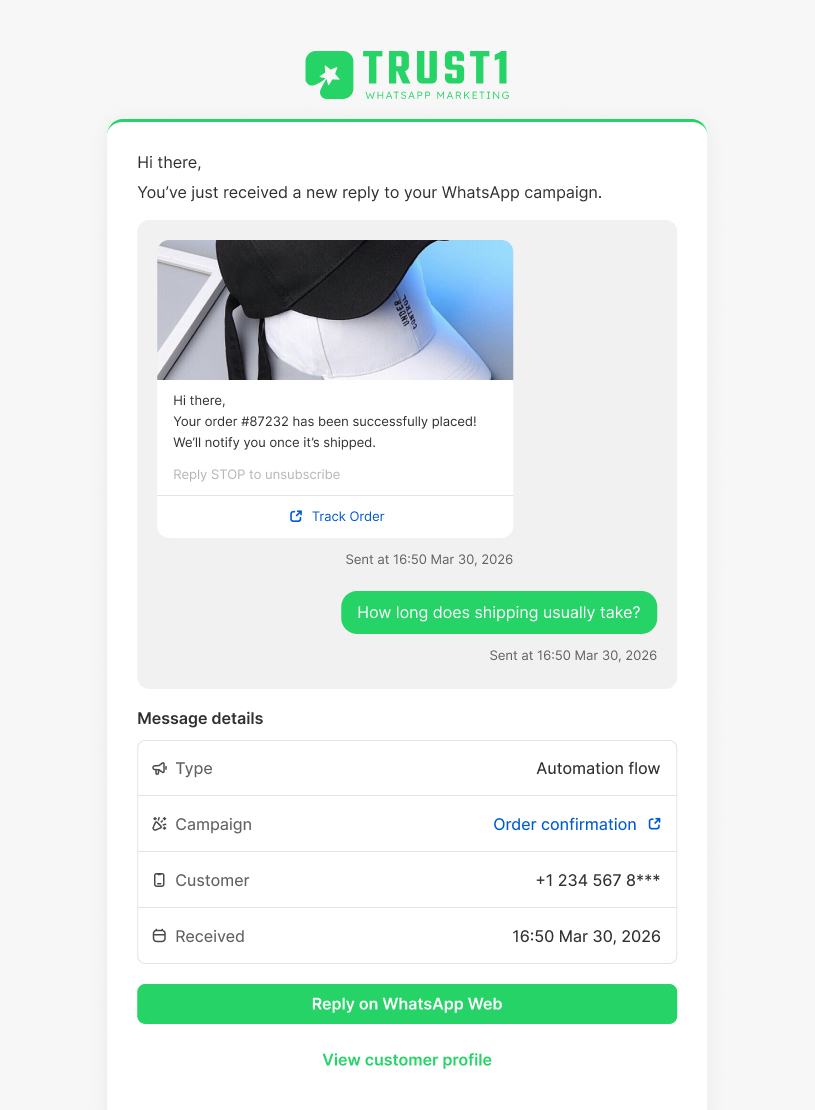
From the notification email, click Reply on WhatsApp Web to continue the conversation directly in WhatsApp.
Note: Replies are handled in WhatsApp, not inside Trust1.
How to Set Up
- Go to Settings → Notifications in your Trust1 WhatsApp admin
- Toggle on Enable Email Notifications
- Enter a Receiving Email Address (defaults to your Shopify store email)
- Click Add to include additional recipients
Enhancements & Improvements
- Automation History — View send history and delivery performance for each automation flow, so you can track what’s working and improve over time.
- Smarter Message Variables — Each trigger type now shows only relevant message variables, making flow setup faster and more accurate.
- Expanded Conditions — New filtering options for building more precise customer segments.
Have questions or feedback? Contact us at [email protected].