


Imagine 10 customers start checkout on your store today. Seven of them leave without paying.
That’s the reality of ecommerce — the average checkout abandonment rate sits around 70%. For a store doing $50,000/month, that’s roughly $116,000 in potential revenue walking away every month. Even recovering 10% of that adds $11,600 to your monthly revenue — without spending a single extra dollar on ads.
The good news: these aren’t lost customers. They already chose your product and started buying. They just need a nudge to come back.
In this guide, we’ll cover what abandoned checkouts are, how to find them in Shopify, and the most effective strategies to recover lost sales — including a step-by-step WhatsApp automation setup.
What Is an Abandoned Checkout?
An abandoned checkout occurs when a customer enters their information and starts the checkout process but doesn’t complete the purchase. Unlike a simple abandoned cart (where items sit in a cart with no checkout attempt), an abandoned checkout means the customer was one step away from buying — they entered their email, shipping details, or payment information, then left.
Shopify considers a checkout abandoned if it remains incomplete for more than 10 minutes after the customer provides their email address.
These are your warmest leads. They’ve already browsed your products, added items to their cart, and started the checkout process. Something stopped them at the last moment — and with the right follow-up, many of them can be brought back.
Common Reasons Customers Abandon Checkout
Understanding why customers leave helps you decide how to bring them back:
- Unexpected costs at checkout — Shipping fees, taxes, or handling charges that weren’t visible earlier are the #1 reason, causing nearly 48% of abandonments
- Required account creation — Forcing customers to create an account before purchasing adds friction
- Complicated checkout process — Too many form fields, too many steps, or a confusing layout
- Slow delivery times — Estimated delivery that feels too long compared to competitors
- Payment concerns — The customer doesn’t trust the site with their payment information
- Limited payment options — No support for their preferred payment method
- Distraction or bad timing — They got interrupted and simply forgot to come back
- Comparison shopping — They’re checking prices at other stores before committing
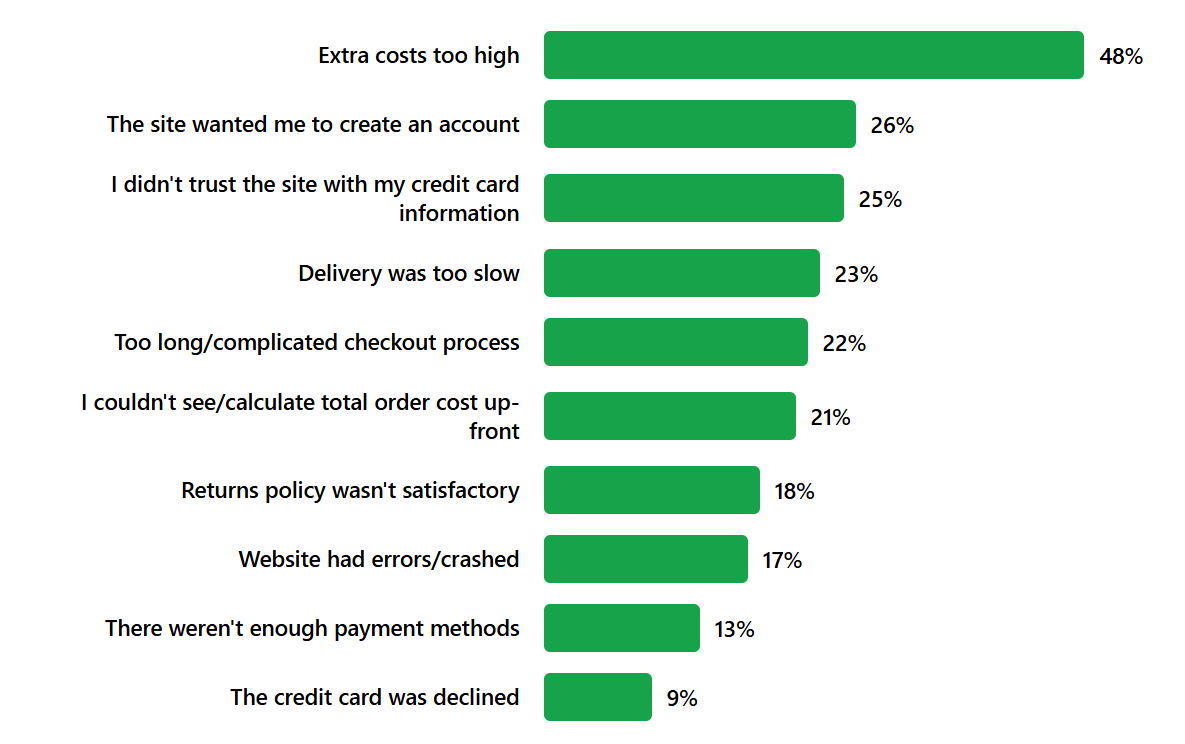
Some of these are fixable through better checkout design. Others require a timely follow-up to bring the customer back.
How to Check Abandoned Checkouts on Shopify
Before recovering abandoned checkouts, you need to see them.
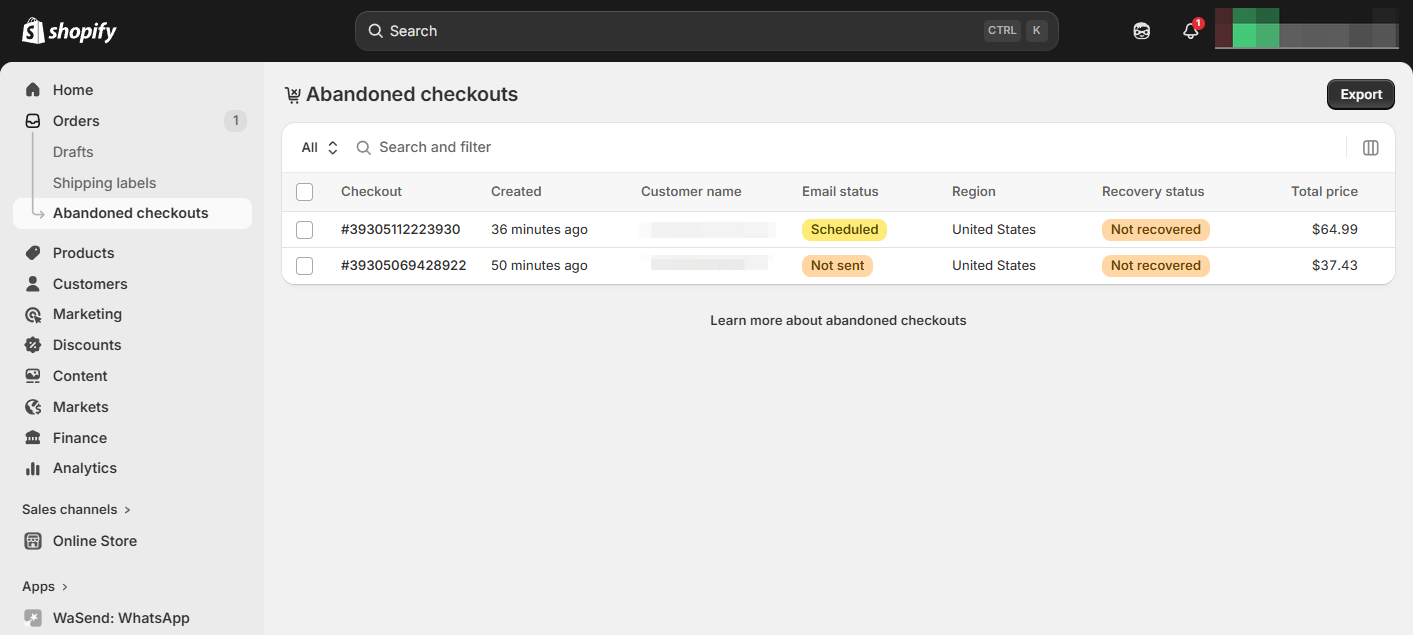
- From your Shopify admin, go to Orders → Abandoned checkouts
- You’ll see a list of incomplete checkouts, including customer name, email, recovery status, total amount, and the time of abandonment
- Click on any abandoned checkout to see the full details — items in the cart, customer contact information, and whether a recovery attempt has already been made
This dashboard gives you a clear view of how much revenue is being left behind and which customers are worth targeting for recovery.
Strategies to Recover Abandoned Checkouts
1. Manual recovery via email
Shopify allows you to manually send a recovery email from the abandoned checkout detail page. Click on an abandoned checkout and select Send a cart recovery email — Shopify sends the customer a link to complete their purchase.
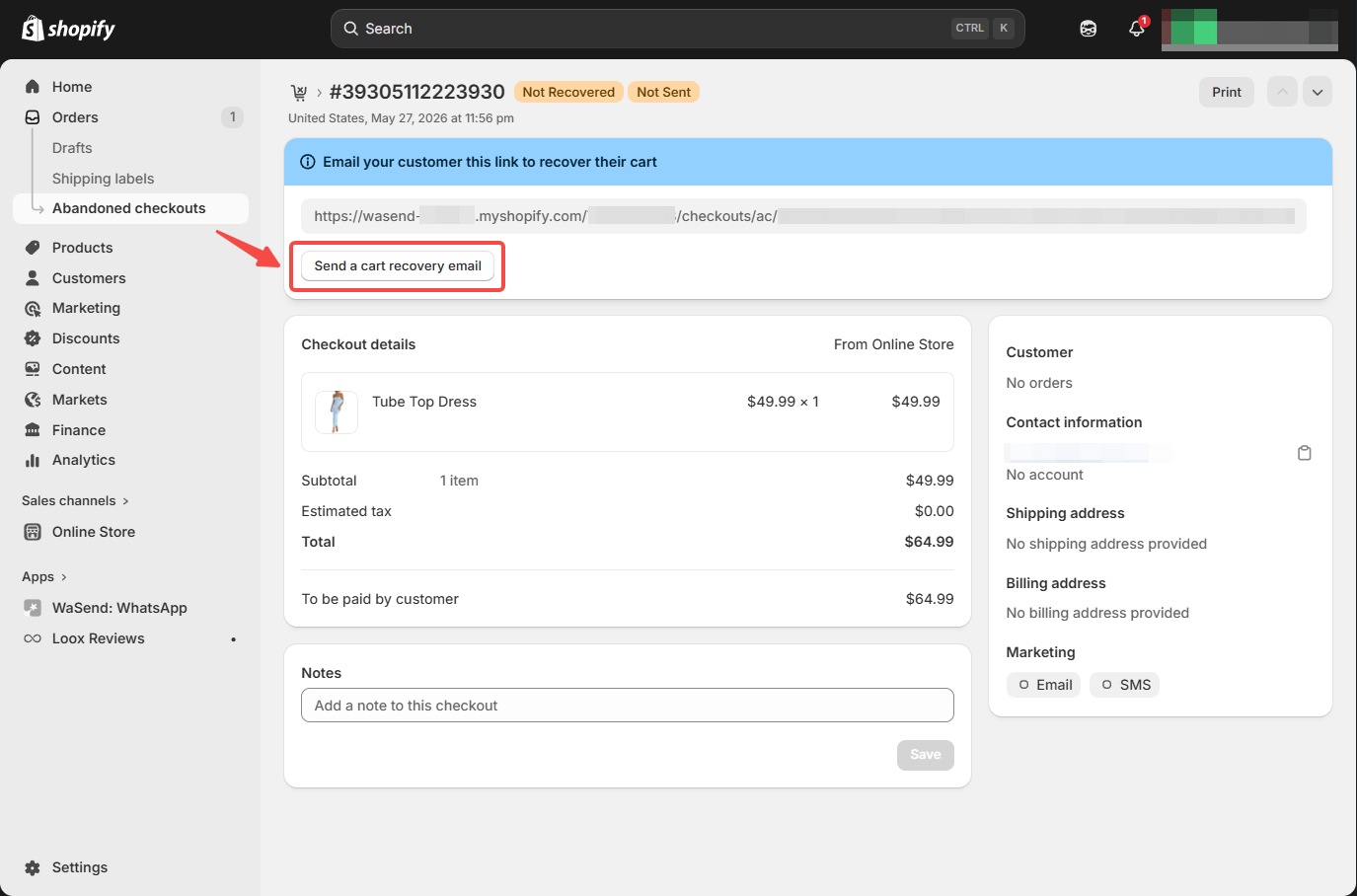
This works for low-volume stores, but it’s not scalable and not in real time — by the time you manually send the email, the customer may have already moved on.
2. Automated recovery emails
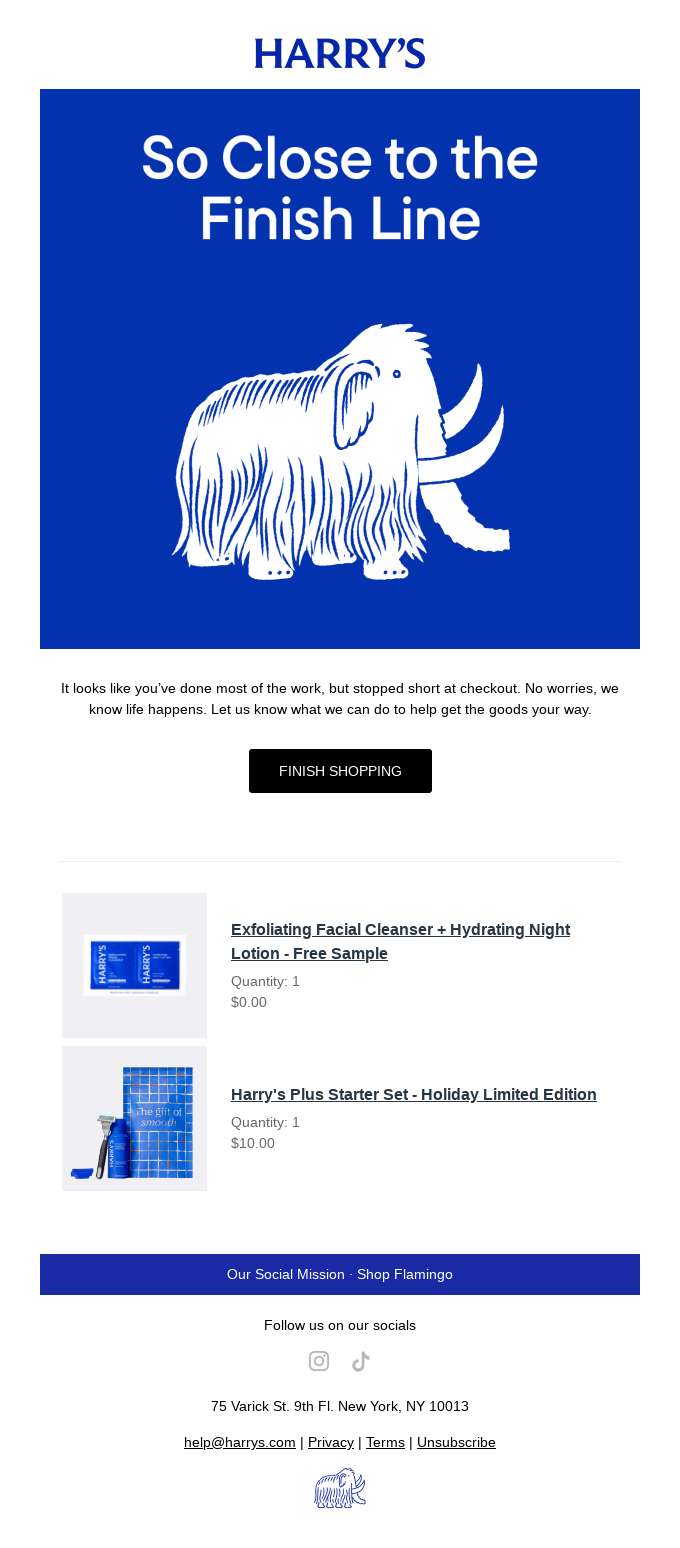
The most common automated approach. When a customer abandons checkout, an email is triggered after a set delay, reminding them of the items they left behind with a direct link to complete the purchase.
Recovery emails perform well — open rates average around 39% with click-through rates of 23%, significantly higher than standard marketing emails. Sending a series of three emails generates up to 69% more orders than a single message.
Recommended apps:
- Klaviyo — Advanced automation with segmentation and multi-email flows
- Omnisend — Beginner-friendly with pre-built abandoned checkout workflows
3. Exit-intent popups
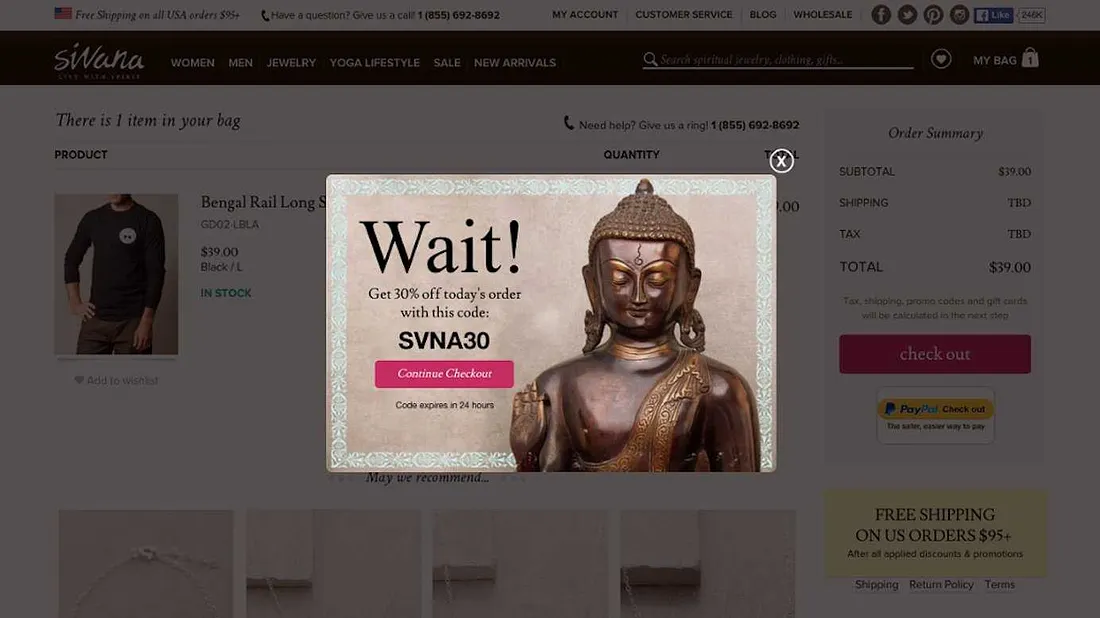
Catch customers before they leave. An exit-intent popup detects when a customer is about to navigate away from the checkout page and shows a last-chance offer — typically a discount or free shipping incentive.
This is a preventive tactic rather than a recovery tactic, but it’s effective. A well-timed popup with a relevant offer can convert a would-be abandoner into a buyer on the spot.
4. Retargeting ads
Show ads to customers who abandoned checkout as they browse other websites and social media. Platforms like Facebook and Google allow you to create audiences based on checkout abandonment events and serve targeted ads reminding them to complete their purchase.
Retargeting works well as a complement to email and messaging — it keeps your products visible even when the customer isn’t checking their inbox.
5. Automated WhatsApp recovery messages
This is where recovery rates jump dramatically. WhatsApp messages achieve 98% open rates compared to email’s 15–20%, with significantly higher click-through and conversion rates.
Instead of your recovery message sitting unread in a crowded inbox, it lands in the app your customer opens 20+ times a day. The result: faster engagement, faster recovery, and more completed checkouts.
Why WhatsApp Stands Out for Checkout Recovery
Email recovery is effective, but it’s getting harder. Inboxes are crowded, spam filters are aggressive, and open rates continue to decline. WhatsApp changes the game:
| Metric | ||
| Open rate | 15–20% | 98% |
| Click-through rate | 2–5% | 45–60% |
| Checkout recovery rate | 5–10% | Up to 40% |
| Average response time | Hours | Minutes |
WhatsApp messages feel personal, not promotional. They arrive in the same place where customers talk to friends and family. And because WhatsApp supports rich media, you can include product images, order details, and a direct checkout link — making it effortless for the customer to pick up where they left off.
How to Set Up WhatsApp Abandoned Checkout Recovery
You can automate abandoned checkout recovery via WhatsApp using Trust1 WhatsApp Marketing and Shopify.
Step 1: Install the app
Install Trust1 — WhatsApp Marketing from the Shopify App Store and connect your WhatsApp Business Account.
Step 2: Create the workflow
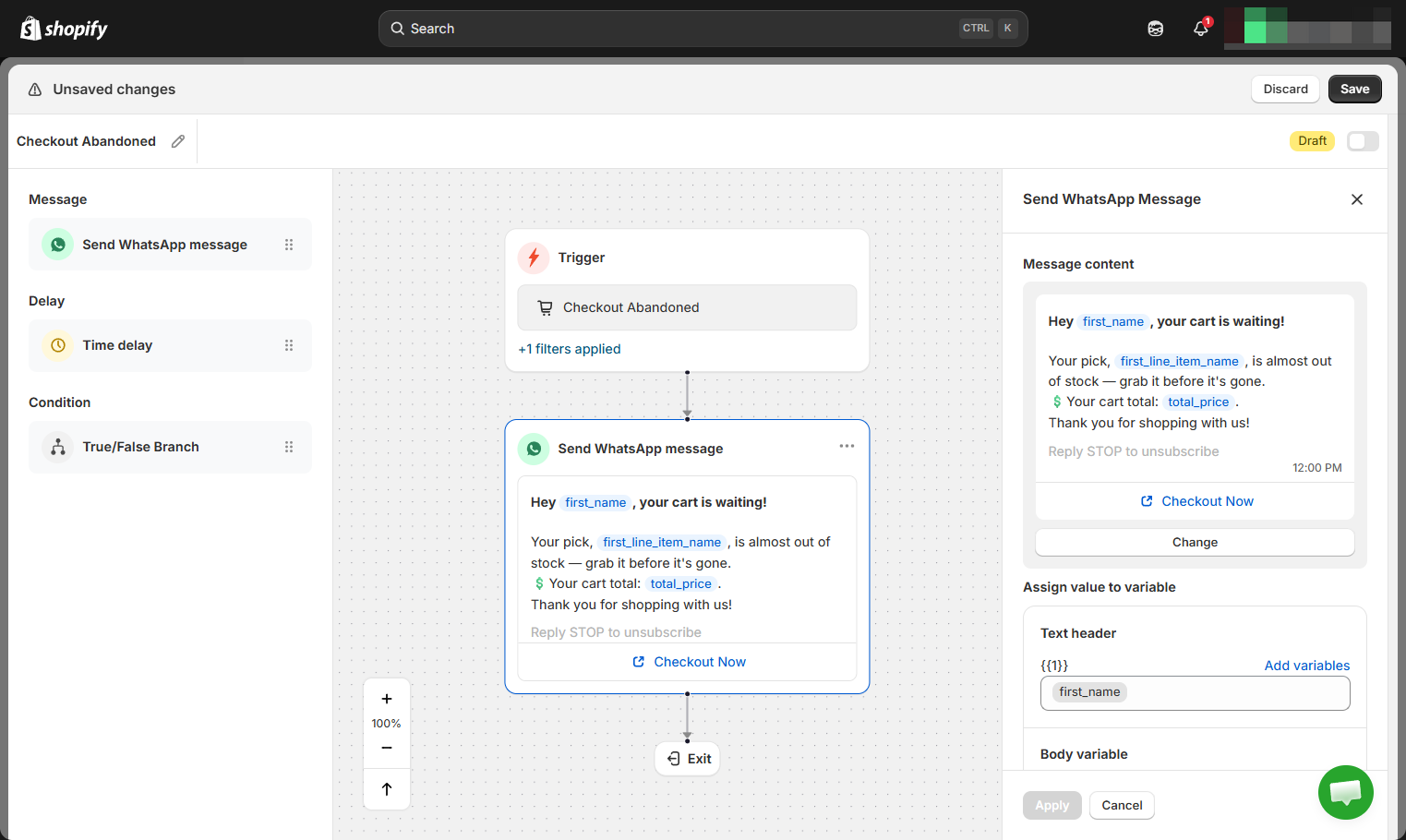
- In your Trust1 dashboard, go to Automations
- Click Create workflow → Create from scratch
- Choose the trigger Checkout Abandoned under “Customer Behavior”
- Add a filter to target only customers who have a phone number
- Add a Send WhatsApp message step — choose an existing template or create a new one
- Make sure to insert the abandoned_checkout_url variable from the provided variables so customers get a direct link back to their checkout
Step 3: Customize with the flow builder
The visual drag-and-drop flow builder lets you fully customize the workflow. Add timing delays, true/false branches, follow-up messages with discount codes, audience filters — all without coding. For example, you can:
- Wait 30 minutes after abandonment before sending the first message
- Send a follow-up with a 10% discount if the customer hasn’t recovered within 24 hours
- Split the flow based on cart value — higher-value carts might get a more personalized message
Step 4: Save and turn on
Toggle the workflow on. From now on, whenever a customer abandons checkout, a WhatsApp message automatically lands in their inbox with a direct link to complete their purchase.
Best Practices for Abandoned Checkout Recovery
Messaging strategy
- Send the first message within 30–60 minutes. The customer is still warm and likely remembers what they were buying. Waiting hours or overnight drops recovery rates significantly. With WhatsApp, this is especially effective — messages are seen within minutes, not hours.
- Lead with a reminder, not a discount. Your first message should simply remind the customer what they left behind with a direct checkout link. Many customers just got distracted and will return without any incentive. Save the discount for a follow-up message 24 hours later if they haven’t recovered.
- Include product images and order details. Visual reminders are far more compelling than generic “you left something behind” text. WhatsApp supports rich media — use it to show the exact products in their cart along with the total amount.
- Always include the checkout link. Every recovery message should take the customer straight back to their checkout with items and information pre-filled. On WhatsApp, this is a single tap — no opening a browser, no logging in, no finding the cart again.
- Limit to 2–3 messages per abandonment. More than that feels aggressive. A good WhatsApp flow: first message at 30 minutes (reminder), second at 24 hours (reminder + incentive), optional third at 72 hours (final nudge with urgency).
- Use incentives strategically. A small discount or free shipping in the second or third message can recover customers who need an extra push. But don’t offer discounts too early — it trains customers to abandon checkout on purpose to trigger a deal.
- Combine WhatsApp and email. Use WhatsApp as your primary recovery channel for customers with phone numbers (98% open rate). Use email as a fallback for customers without WhatsApp or who didn’t respond. Together, you cover the widest possible audience.
Optimize and scale
- Personalize by cart value. High-value carts deserve more attention. Consider a more personalized message, a higher discount, or an additional follow-up for carts above a certain threshold. Trust1’s flow builder makes this easy with true/false branches based on cart value.
- Track recovery rate and revenue recovered. Monitor how many abandoned checkouts are recovered, total revenue recovered, and which messages perform best. Test different timing, message copy, and incentive amounts to continuously improve.
Final Thoughts
Every abandoned checkout is a customer who was almost ready to buy. They’ve already done the hardest part — finding your store, choosing a product, and starting the checkout. A well-timed follow-up is often all it takes to bring them back.
Start with automated emails as your baseline recovery channel. Then add WhatsApp to capture the customers that email misses — with 98% open rates and up to 40% recovery, it’s the most effective checkout recovery channel available today.