



Cash on Delivery (COD) is one of the most popular payment methods in ecommerce — especially in markets like India, Southeast Asia, Brazil, and the Middle East. It gives customers the comfort of paying only after receiving their order, which builds trust and drives higher conversion rates.
But COD comes with a serious downside: fake orders, non-serious buyers, and costly failed deliveries. Industry data shows that COD return-to-origin (RTO) rates can reach 25–40%, meaning up to 4 out of 10 COD orders never get paid for. Each failed delivery costs you forward shipping, return shipping, repackaging, and wasted processing time.
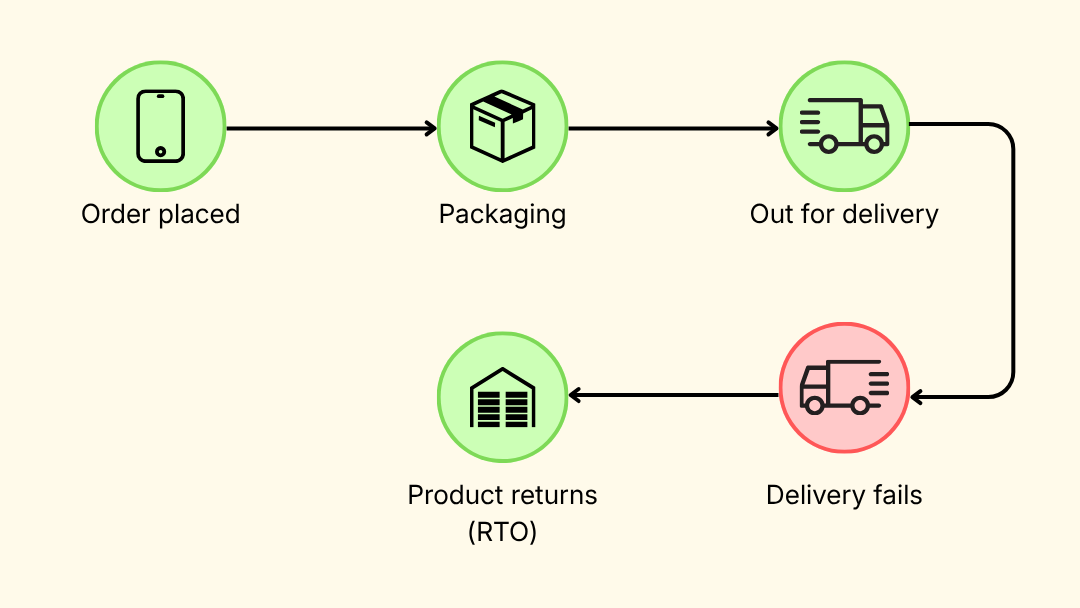
COD verification solves this by confirming the customer’s intent before you ship. In this guide, we’ll cover what COD verification is, why it matters, the most common methods, and how to set it up on your Shopify store using WhatsApp automation.
What Is COD Verification?
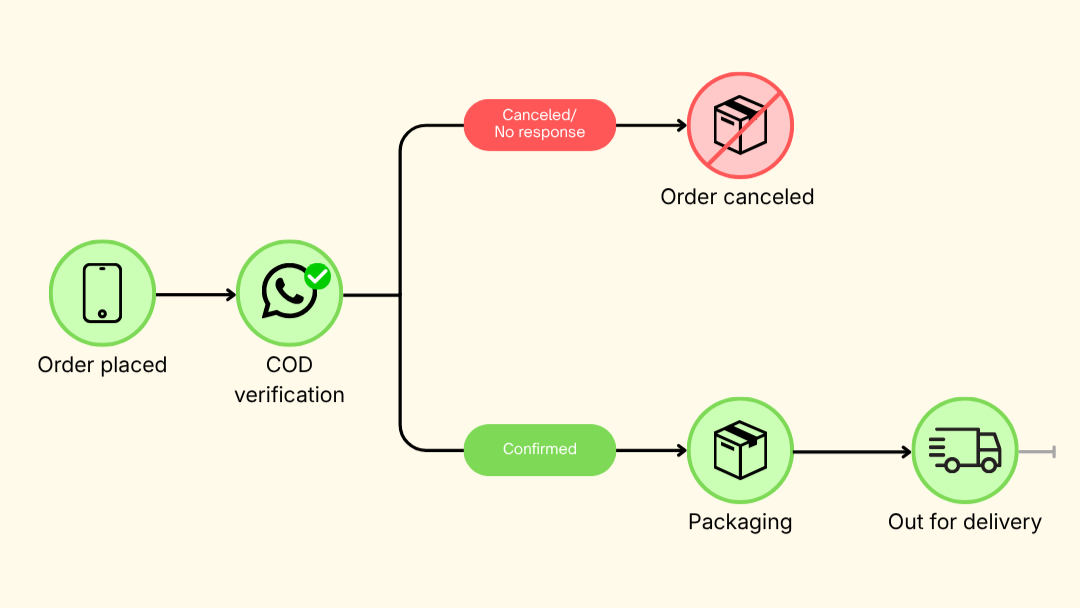
COD verification is the process of confirming the authenticity of a COD order before processing it for delivery. It typically involves contacting the customer — via phone call, SMS, or messaging app — to confirm their order details and ensure they genuinely intend to pay upon delivery.
If the customer confirms, the order moves to fulfillment. If they don’t respond or cancel, the order is flagged or automatically cancelled — saving you the cost of shipping a package that would have been rejected.
Why COD Verification Is Essential
Without verification, you’re shipping orders on blind faith. Here’s what’s at stake:
- Fake and fraudulent orders. With no upfront payment, there’s nothing stopping prank buyers, competitors, or bots from placing bogus orders with fake names and addresses. Around 8–10% of COD orders are estimated to be fraudulent.
- Non-serious buyers. COD removes financial commitment at checkout. Some customers place orders impulsively, then change their mind, find a better deal, or simply don’t answer the door when the delivery arrives.
- High return-to-origin (RTO) costs. Every failed delivery hits you twice — you pay for the forward shipment and the return. For businesses with thin margins, RTO rates of 25–40% can be devastating to profitability.
- Damaged delivery efficiency. Failed deliveries waste your courier’s time and capacity, slowing down legitimate orders and increasing your overall logistics costs.
- Inflated customer acquisition costs. You’re paying for ads to acquire these customers. When a COD order fails, you’ve spent the acquisition cost plus the shipping cost — and gotten nothing in return.
COD verification directly addresses all of these by filtering out bad orders before they enter your fulfillment pipeline.
What COD Verification Does for Your Business
When you enable COD verification, you can:
- Filter out fake orders by confirming the customer’s phone number is valid and reachable
- Reduce RTO rates by verifying the customer’s intent to receive and pay for the order
- Give customers a chance to cancel if they placed an order accidentally, saving you the shipping cost
- Eliminate manual confirmation calls by automating the verification process
- Protect your brand reputation by ensuring smooth deliveries and reducing negative courier interactions
Brands that implement COD verification consistently report RTO reductions of 25–30%, translating directly into cost savings and healthier margins.
Popular COD Verification Methods
Phone call verification
A team member calls the customer to confirm their order details before shipping. This is the most traditional method and allows for personal interaction, but it’s time-consuming, hard to scale, and impractical for stores processing high volumes of COD orders.
SMS or OTP verification
An automated SMS is sent to the customer with a one-time password (OTP) or a confirmation link. The customer replies or enters the code to verify their order. This is faster and more scalable than phone calls, but SMS open rates and response rates can be inconsistent, and SMS costs add up at volume.
WhatsApp verification
An automated WhatsApp message is sent to the customer asking them to confirm or cancel their order. The customer simply taps a button or replies to confirm — the order is then marked as verified and moves to fulfillment.
WhatsApp verification stands out for several reasons:
- 98% open rates — WhatsApp messages are almost always seen, unlike SMS or email
- Instant response — Customers are already active on WhatsApp and can confirm with a single tap
- Rich messaging — You can include order details, product images, and clear confirm/cancel buttons
- Familiar and trusted — Customers communicate with friends and family on WhatsApp daily, so a verification message feels natural, not intrusive
- Scales effortlessly — Fully automated, works for 10 orders or 10,000 orders per day
- Lower cost than SMS — WhatsApp Business API messages are typically cheaper than SMS, especially for international orders
For Shopify stores selling in COD-heavy markets, WhatsApp verification is the most effective and cost-efficient method available.
How to Set Up COD Verification via WhatsApp on Shopify
You can automate COD verification on your Shopify store using Trust1 WhatsApp Marketing. Here’s how:
Step 1: Install the app
Install Trust1 — WhatsApp Marketing from the Shopify App Store and connect your WhatsApp Business Account.
Step 2: Create the workflow
- In your Trust1 dashboard, go to Automations
- Click Create workflow → Create from template
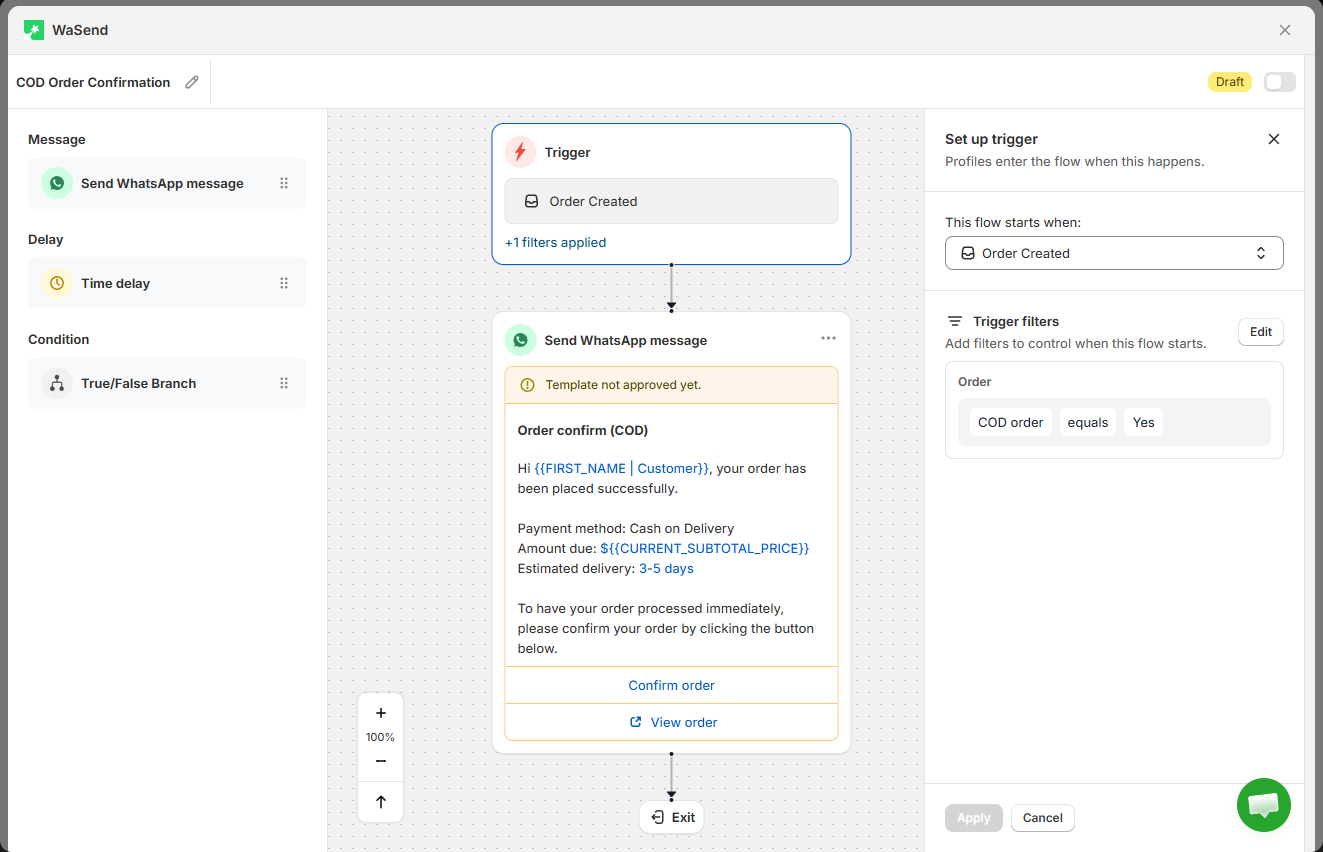
- Select “COD Order Confirmation” and click Use flow
The app creates a complete COD verification flow automatically — trigger, timing, message, and confirmation logic included.
Step 3: Customize with the drag-and-drop flow builder
The visual flow builder lets you fully customize the workflow to fit your business. Add true/false branches, send reminders to unresponsive customers, filter audiences by order value or region, adjust timing and delays, and edit message templates — all with drag and drop, no coding needed.
Step 4: Save and turn on
Toggle the workflow on. Every COD order will now trigger an automatic WhatsApp verification message. Confirmed orders proceed to fulfillment. Cancelled or unresponsive orders are flagged — saving you the cost of a failed delivery.
Over time, you’ll build data on which regions, customer segments, or order values have the highest fake order rates — allowing you to fine-tune your verification rules and further reduce losses.
Best Practices for COD Verification
- Send the verification message immediately. The sooner after order placement, the better. Customers are most engaged right after they buy — waiting too long reduces response rates and delays fulfillment.
- Keep the message simple. Include the order number, items ordered, total amount, and two clear options: Confirm or Cancel. Don’t clutter it with promotions or unnecessary information.
- Set a response window. Give customers a reasonable time to respond (e.g., 12–24 hours). If they don’t respond within that window, send one reminder before auto-cancelling.
- Apply verification strategically. You don’t necessarily need to verify every COD order. Consider applying it to first-time customers, orders above a certain value, or deliveries to high-RTO regions — while letting repeat, trusted customers skip the step for a smoother experience.
- Track your RTO rate before and after. Measure the impact of verification on your failed delivery rate so you can quantify the cost savings and optimize over time.
Final Thoughts
COD is a powerful conversion driver — but without verification, it can quietly drain your profits through fake orders, failed deliveries, and inflated logistics costs.
WhatsApp verification is the fastest, most cost-effective way to confirm COD orders before you ship. With 98% open rates and one-tap confirmation, it filters out bad orders while keeping the experience smooth for genuine customers.
Set it up once, automate it, and start saving on every COD order.